Color Oasis - Color by Number
Tap Color StudioBoard
4.85.65K Reviews
- Version
- 1.2.39
- Installs
- 10.00M
- Age Rating
- Everyone
Screenshots


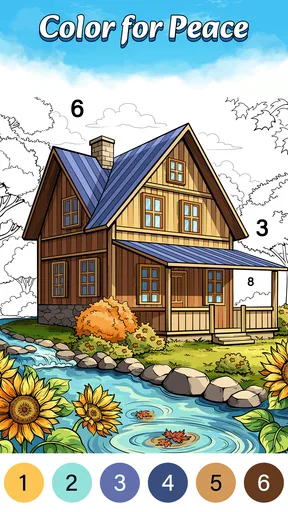
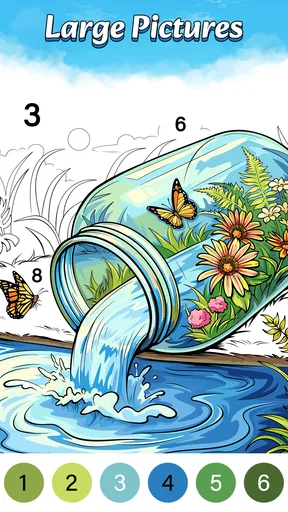

Our Review of Color Oasis - Color by Number
 Analysis by Appyee
I reach for Color Oasis - Color by Number when I want a small, low-pressure activity that gives my hands something to do without asking me to invent a picture from scratch. It is a mobile board-style coloring game from Tap Color Studio, built around filling numbered sections in illustrated images. That simple premise is the point: I can start with little effort, pause when real life interrupts, and return to the same kind of focused, quiet task later.
It is free to download, with optional in-app purchases listed from $0.99 to $49.99 per item. That makes the entry decision easy, but it is worth separating “free to try” from “everything is free”: paid items are part of the offer, and I would check what a purchase covers before paying. For casual coloring, I’d begin without spending and see whether the available experience suits me first.
Coloring that fits into a spare moment
The numbered format removes the hardest blank-page question: what should I draw, and which color belongs where? Instead, I choose an image and work through its marked areas. I find that especially useful when I want a calming break but don’t have the energy to plan a creative project. It is closer to a guided puzzle than freehand art, so the satisfaction comes from steadily completing the picture rather than making every artistic decision myself.
In a typical day, I might open it while waiting for an appointment or winding down before bed, choose an image that looks manageable, and color for a few minutes. That kind of short session is where the format works best. It gives me a clear next action without demanding a long uninterrupted stretch, although a very detailed picture can make a quick break feel less tidy if I keep chasing tiny sections.
How the guided format feels
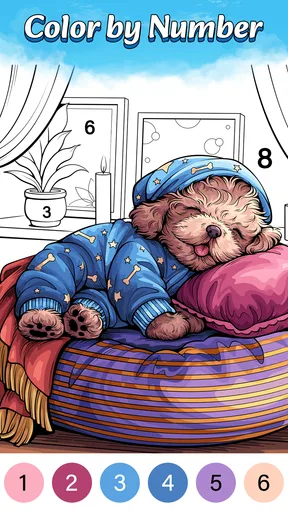
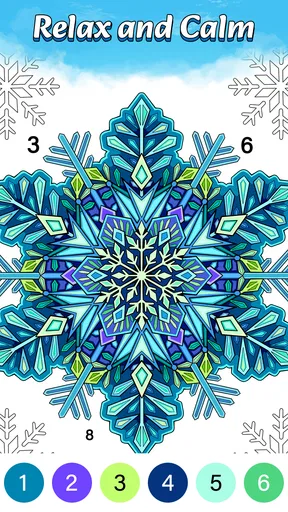
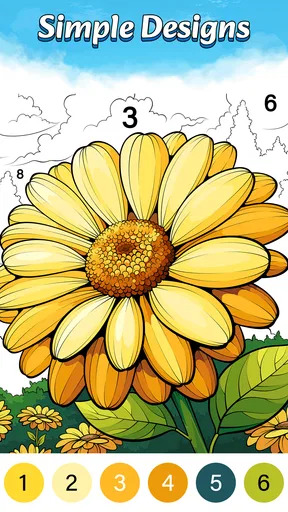
When I first opened Color Oasis - Color by Number, I was greeted by a vibrant gallery of images waiting to be brought to life. From intricate mandalas to picturesque landscapes, there's a little something for everyone. The app's interface is user-friendly, making it super easy to navigate through the categories and select an image that catches your eye.
The beauty of this app lies in its simplicity. You don’t need to be a professional artist to create something beautiful. Each image is broken down into numbered sections, and all you have to do is match the numbers with the corresponding colors. It’s as easy as pie!
That ease has a trade-off I’d keep in mind: the numbers guide the result, so this is not the same as drawing or choosing a palette freely. If I want to experiment with composition, sketch a personal subject, or make deliberate color choices, a drawing app or a blank paper coloring tool is a better fit. Here, the pleasure is in following a design to completion and seeing it gradually become coherent.
Small choices that make sessions smoother
One of my favorite features is the extensive color palette. With a tap of your finger, you can access a wide array of colors, allowing your creativity to flow freely. The app updates regularly, adding new images and palettes to keep things fresh and exciting.
Another neat aspect is the time-lapse video feature. Once you’ve completed your masterpiece, you can watch a replay of your coloring journey from start to finish. It’s incredibly satisfying to see your artwork come to life, and it’s a great way to share your creations with friends on social media.
A practical way to choose an image is to match its visual density to the time and attention I have. A bold, spacious design is a more forgiving choice when I’m tired or likely to be interrupted; a highly detailed scene makes more sense when I’m settled and want a longer, more absorbing task. I also treat the replay as a finishing touch rather than the reason to color: the main reward is the gradual change on screen, while the time-lapse gives me a compact way to revisit the process afterward.
The game’s current version is 1.2.24, and it runs on Android 6.0 or later. Its Everyone age rating makes it broadly accessible, though the numbered coloring approach will appeal most to people who actually enjoy patient, repetitive tapping. If I were choosing it for a child or sharing a device, I’d still look at the in-app purchase prompts together rather than assuming that a free download means every option is included.
Where it sits among coloring alternatives
Compared with physical coloring books, this is tidier and easier to carry: there is no paper to store, no pens to replace, and no risk of coloring outside a printed page. The reverse is that a phone screen does not offer the same tactile feel, and the result is digital rather than a page I can keep on a desk. Compared with open-ended drawing apps, it asks much less of my imagination but offers less control. That middle ground is useful if I want a guided activity, not a substitute for making my own art.
It also differs from a quick logic or word puzzle. The numbered sections provide structure, but I’m not trying to solve a clue or beat a score; I’m completing an image at my own pace. If I need a sharper mental challenge, I’d choose a puzzle game. If I need a screen-free break, I’d choose a paper book. I pick this when the convenience of a ready-made picture matters more than either of those alternatives.
A calming break, with realistic limits
If you’re like me, always on the hunt for ways to unwind after a hectic day, this app is a godsend. There’s something incredibly calming about focusing on coloring within the lines. It’s a great way to disconnect from the digital noise and engage in a mindful activity. Before you know it, you’ll find yourself lost in a meditative state, with stress melting away with each stroke.
I’d describe that as a welcome chance to focus, not a guaranteed way to feel relaxed. The screen remains part of the experience, and repeated tapping may not suit everyone. When my eyes are tired or my hands want a break from the phone, I would put it down rather than forcing a session. The same is true if I’m impatient: detailed designs can ask for more persistence than the simple rules first suggest.
What to consider before choosing it
While Color Oasis - Color by Number is a delightful escape, it’s not without its quirks. Occasionally, the app can be a bit laggy, especially when dealing with highly detailed images. However, this is a minor hiccup and doesn’t detract too much from the overall experience.
That performance friction matters most when I choose a complex image because the tiny sections already demand more careful attention. If the game starts to feel slow, switching to a simpler picture is a sensible way to keep the session enjoyable rather than turning a relaxing pastime into troubleshooting. I’d also avoid beginning a demanding design in a moment when I have only a few seconds; the format is easy to start, but not every image feels equally suited to a brief pause.
The app is free to download, but it does offer in-app purchases. Some users might find the ads a tad intrusive, but hey, that’s the trade-off for a free app, right?
For me, the sensible value test is straightforward: try the free access first, notice whether the image selection and pace keep me coming back, and only then consider paying for an item if its contents seem worthwhile to me. The listed purchase range is broad, so I wouldn’t treat one price as representative of every option. I’d be comfortable recommending a no-spend trial to someone curious about color-by-number, but I would not promise that paid items are necessary or that every player will find them worthwhile.
The game has an average rating of 4.8 from around 116,000 ratings, with roughly 4,600 written reviews and over 10 million installs. That level of uptake suggests many people have found the basic idea appealing, but popularity does not settle whether the tapping style, ad experience, or purchase options will suit me personally. I’d use those figures as context, then make the decision based on how it feels during my own short sessions.
Who is likely to get the most from it
I’d point a friend toward this if they want a guided, low-stakes activity for waiting rooms, quiet evenings, or a short reset between tasks. It is also a good match for someone who likes seeing a picture take shape but doesn’t want to draw outlines or choose every color. Tap Color Studio has made the core interaction approachable, and the gallery’s mix of mandalas and landscapes gives me different moods to choose from without changing the basic routine.
I’d steer away from it if the person wants freehand control, a physical craft, or a fast challenge with a score and clear win condition. It may also be a poor match for anyone who strongly dislikes ads, repeated touch interactions, or the possibility of in-app spending. The game’s free starting point lowers the risk of trying it, but it does not erase those preferences.
My verdict on the value
All in all, Color Oasis - Color by Number is a delightful app that offers a perfect blend of creativity and relaxation. Whether you’re a seasoned artist or just looking for a fun way to pass the time, this app is sure to brighten up your day. It’s easy to use, has a vast library of images, and most importantly, it’s a wonderful way to unleash your inner artist.
My recommendation is more specific: try it if you enjoy guided coloring and want a portable activity that can fit around an ordinary day. Keep expectations grounded if you’re seeking complete artistic freedom, a screen-free hobby, or a reliably smooth experience on every intricate image. I’d start with an uncomplicated picture, see how the tapping feels, and decide whether the free experience is enough before considering a purchase.
So, why not give it a whirl? Dive into the colorful world of Color Oasis - Color by Number and let your imagination run wild. Trust me, you won’t be disappointed!
Privacy and Permissions
See what permissions an app requests and how it handles your data.
- Photos/Media/Files
- read the contents of your USB storage, modify or delete the contents of your USB storage
- Storage
- read the contents of your USB storage, modify or delete the contents of your USB storage
- Wi-Fi connection information
- view Wi-Fi connections
- Other
- view network connections, pair with Bluetooth devices, access Bluetooth settings, change network connectivity, full network access, control vibration, prevent device from sleeping, Google Play license check
Verdict
Strengths of Color Oasis - Color by Number
- Vibrant and diverse color palettes.
- Intuitive and easy-to-use interface.
- Regular updates with new images.
- Offline mode available for convenience.
- Relaxing and stress-relieving experience.
Limitations of Color Oasis - Color by Number
- Contains ads that can be intrusive.
- Limited free content; in-app purchases needed.
- Occasional app crashes reported by users.
- Requires a stable internet for updates.
- No option for custom images to color.
Other Releases by Tap Color Studio
View All
Tap Color Pro: Color By Number
Board4.5

Tap Color® Color by number
Board4.7

Sortime - Goods Puzzle Sorting
Puzzle4.4
Similar Picks in This Category
View All
Ludo King®
Gametion4.1

Ludo
Yarsa Games4.6

Tile Master® - Matching Game
Higgs Studio3.6

Checkers Online
CC Games4.6

Dominoes
Loop Games4.7

Chess
Chess Prince4.6
Frequently Asked Questions
What is Color Oasis - Color by Number?
Color Oasis - Color by Number is a digital coloring app that allows users to relax and unwind by filling in pre-designed images with colors. Each image is divided into numbered sections, and users simply tap to color according to the numbers. It's a great way to relieve stress and enhance creativity.
Is Color Oasis - Color by Number free to use?
Color Oasis offers a free version with a variety of images to color. However, there are in-app purchases available for additional features, such as premium images, ad-free experience, and more advanced coloring tools. Users can enjoy the basic features without spending any money, making it accessible for everyone.
Can I use Color Oasis - Color by Number offline?
While you need an internet connection to download the app and access new images, you can color previously downloaded images offline. This feature is particularly useful for users who want to enjoy the app while traveling or in areas with limited connectivity.
Does Color Oasis - Color by Number support sharing completed artworks?
Yes, once you complete a coloring page, you can easily share your masterpiece with friends and family via social media platforms or messaging apps. The app provides a seamless way to showcase your creativity and receive feedback or appreciation from your network.
How user-friendly is Color Oasis - Color by Number for beginners?
Color Oasis is designed with simplicity in mind, making it accessible for users of all ages and skill levels. The intuitive interface and easy-to-follow number system ensure that even beginners can start coloring without any prior experience. The app also offers tutorials and tips to enhance the user experience.
Play our best games!


